
SN-SMSEagle


SN-SMSEagle module
Active Alarm Communication for Niagara Systems
The SN-SMSEagle module natively integrates the functionality of the SMSEagle industrial communication gateway into the Niagara Framework. It enables critical alarms generated by the Niagara system to be delivered via SMS, voice call, WhatsApp message or Text-to-Speech voice notification. Alarms can also be acknowledged directly from a mobile phone by replying via SMS.
The module can be used directly within the Niagara environment without the need for separate middleware or complex scripting. Its components can be integrated into standard Niagara logic, enabling fast configuration and easy maintenance.
What happens if the system raises an alarm, but no one responds in time?
In critical infrastructure, building management systems and industrial automation environments, delayed alarm detection can pose a serious risk.
A simple SMS can easily go unnoticed, especially during night shifts, in noisy industrial environments or when several alarms occur at the same time. The SN-SMSEagle module is designed to ensure that alarms from the Niagara system do not remain passive messages, but instead initiate an active communication process.
The system can send SMS messages, initiate voice calls, read text aloud and manage alarm acknowledgments directly from a mobile phone, without requiring access to Niagara Workbench.
Multiple Communication Channels from a Single Module
The SN-SMSEagle module supports multiple notification methods, allowing the alarm workflow to be tailored to the specific requirements of each project.
Supported communication methods:
.png)
.png)
.png)
.png)

.png)
SMS messaging
Voice calls
SMS and voice calls
Text-to-Speech calls
Advanced multilingual Text-to-Speech calls
WhatsApp messaging
Multi-channel notification is particularly useful in systems where critical events must reach on-call personnel quickly and reliably.
Key Features
1. Native Niagara Components in a Single Interface
The components of the SN-SMSEagle module can be used directly on the Niagara Workbench wiresheet.
SMS, WhatsApp, voice call, contact management and SlotReader functions are provided as separate components that can be integrated into existing alarm logic.

The SN-SMSEagle module can be integrated into the station architecture using native Niagara components.

2. SMS-Based Alarm Notifications
The SMS component automatically forwards alarms generated by the Niagara system to the relevant on-call personnel.
The message content can include dynamic alarm information, such as the alarm source, status, timestamp or unique identifier.
SMS alarm notifications with dynamic Niagara alarm data.
3. WhatsApp Notifications
The module also supports WhatsApp messaging, allowing alarms to be delivered through a familiar mobile communication channel.
The WhatsApp component can be used for forwarding alarm messages in the same way as the SMS component.
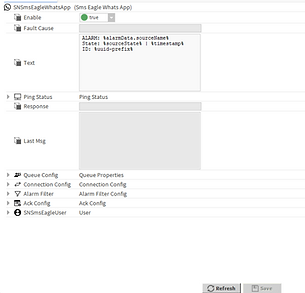

WhatsApp-based alarm notifications from the Niagara environment.
4. Voice Call and Text-to-Speech Alarms
The call component can automatically initiate a voice call when an alarm occurs.
Depending on the selected call type, the system can use a standard ringing call, spoken text or an advanced Text-to-Speech call.
Automatic voice call and Text-to-Speech alarm notifications based on Niagara alarm events.
5. Two-Way Alarm Acknowledgment from a Mobile Phone
The SN-SMSEagle module does more than send notifications. It also enables alarms to be acknowledged directly from a mobile phone.
On-call personnel can manage alarms by replying with commands such as ACK, ACK ALL or DETAILS.
User settings can define who is allowed to receive notifications and who is authorized to reply to and acknowledge alarms.

Alarm acknowledgment from a mobile phone using ACK, ACK ALL and DETAILS responses.


Message queue, connection settings and alarm filtering within a single component.
6. Queue Management, Connection Settings and Alarm Filtering
Queue Config, Connection Config and Alarm Filter settings can be used to control how messages are sent.
The SMSEagle device connection details, maximum message queue size and the alarm states that trigger notifications can all be configured.
This helps the system manage outgoing messages in a transparent and controlled manner, even during periods of high alarm activity.
7. Contact and Group Management
The ContactManager component allows SMSEagle contacts and groups to be viewed and managed directly from Niagara Workbench.
Recipients can therefore be selected not only by entering individual telephone numbers, but also by using stored contacts or complete contact groups.

Managing SMSEagle contacts and groups from the Niagara environment.


8. Reading SMSEagle NXS I/O Data
For NXS-type SMSEagle devices, the SlotReader component can be used to display digital input and output states, as well as temperature and humidity data, within the Niagara system.
This means that the SMSEagle device can be integrated into the station not only as a communication gateway, but also as a source of status and I/O information.
Digital I/O, temperature and humidity data from an NXS device displayed in the Niagara system.
Native Niagara Integration
The SN-SMSEagle module can be used directly in a Niagara 4 environment. Its components are available from the palette and can be integrated into standard Niagara wiresheet logic.
The module supports the configuration of SMS-based, call-based and user-specific alarm workflows. Its transparent Niagara-side architecture makes the system easier to document and maintain.
Result: faster commissioning and a more transparent system architecture.
Hardware I/O Support for NXS Devices
For NXS-type SMSEagle devices, the module can display selected hardware I/O points and device status information within the Niagara system.
Supported functions:
-
Reading digital inputs
-
Controlling digital outputs
-
Displaying temperature data
-
Displaying humidity data
-
Monitoring device statuses
As a result, the SMSEagle device can be used not only as a communication gateway, but also as an integrated source of status and I/O information within the Niagara system.

Application Areas
-
Building management systems and BMS applications
-
Industrial automation
-
Data centres
-
Critical infrastructure
-
On-call and remote monitoring systems
-
Energy facilities
-
Healthcare and technology environments
-
Systems where delayed response may result in significant risk
Technical Overview
The SN-SMSEagle module is recommended for systems where the fast and reliable delivery of alarm notifications is particularly important.
Key Technical Features
-
Niagara 4.x support
-
Supervisor and JACE deployment
-
API2 support
-
SMS, Voice Call, Text-to-Speech and Advanced Text-to-Speech functions
-
WhatsApp messaging support
-
AlarmDemux support
-
Contact-based and group-based addressing
-
Queue management
-
PIN-protected alarm acknowledgment
-
Token-based authentication
-
SmartNode licensing and support
Demonstration Videos
Watch our short videos to see how the SN-SMSEagle module operates within the Niagara environment.
The videos demonstrate SMS-, WhatsApp- and voice-call-based alarm notifications, Text-to-Speech notifications, ACK acknowledgment from a mobile phone, as well as the management of contacts, groups and NXS I/O data.
SN-SMSEagle
SN-SMSEagle


1_2_demo-sms-phone

call

telefon-sms-alarmack
Downloadable Documents
User manual
Download the SN-SMSEagle module user manual, which explains how to use the Niagara components and configure alarm notification functions, two-way acknowledgment, queue management and NXS I/O integration.
Download the SN-SMSEagle product flyer for a concise overview of the solution’s key features, benefits, and possible applications.
Product Flyer
Make Your Niagara Alarm Workflows More Reliable
With the SN-SMSEagle module, critical alarms are not simply sent as notifications. Instead, they initiate an active and traceable communication process.
Whether the selected channel is SMS, voice call, WhatsApp messaging or a Text-to-Speech notification, the module is designed to ensure that the right information reaches the right person at the right time.
Contact our team to request a quotation or a technical consultation regarding the implementation of the SN-SMSEagle module.